Appearance
快速上手
提示
@nexacore/vantage 基于 vue3 + ts + Element-plus 再次封装的基础组件
安装
建议您使用包管理器 (pnpm推荐 , yarn,npm) 安装@nexacore/vantage。
sh
pnpm install @nexacore/vantagesh
yarn add @nexacore/vantagesh
npm install @nexacore/vantage全局使用
前提条件:使用项目必须全局注册 Element-plus 组件库
提示
重要
import Vantage from '@nexacore/vantage'
import '@nexacore/vantage/lib/style.css'
引入此组件并装载
app.use(Vantage);
js
// main.ts
import { createApp } from "vue"
import App from "./App.vue"
import ElementPlus from "element-plus"
import "element-plus/dist/index.css"
import "element-plus/theme-chalk/dark/css-vars.css"
import locale from "element-plus/es/locale/lang/zh-cn"
// element-plus图标
import * as ElementPlusIconsVue from "@element-plus/icons-vue"
import TuiPlus from "@wocwin/vantage"
import "@wocwin/vantage/lib/style.css"
import axios from 'axios'

const app = createApp(App)


const X_YUJIA_CURRENT_APP: X_YUJIA_CURRENT_APP_TYPE = {
    id: 5,
    imgUrl: "293761873408770048",
    orgId: "1902979970779631617",
    dataPermControlBy: 0,
    auth_enabled: false,
    loginUrl: "http://automotive-dev-app.asiic.cn/dsc/login",
    defaultComponentName: "unknown-defaultComponentName",
    redirectUrlIndex: "http://automotive-dev-app.asiic.cn/dsc/dashboard",
    appId: "automotivesteel",
    name: "汽车钢",
    uri: "http://automotive-dev-app.asiic.cn",
};

const X_YUJIA_PRINCIPAL: X_YUJIA_PRINCIPAL_TYPE = {
    roleCodes: "'SuperAdmin'",
    enabled: true,
    jobCodes: "",
    accountNonLocked: true,
    credentialsNonExpired: true,
    accountNonExpired: true,
    userAgent:
        "Mozilla/5.0 (Windows NT 10.0; Win64; x64) AppleWebKit/537.36 (KHTML, like Gecko) Chrome/138.0.0.0 Safari/537.36",
    address: {},
    is_dummy: false,
    manageOrgId: "1934908601327996929",
    clientType: 0,
    companyCode: "51012053",
    name: "吴琦",
    orgName: "鞍钢集团有限公司高新汽车材料营销服务中心领导",
    id: "1930910996054986753",
    orgCode: "51012063",
    manageCompanyCode: "51012053",
    birth: "",
    manageOrgName: "鞍钢集团有限公司高新汽车材料营销服务中心领导",
    manageOrgCode: "51012063",
    appId: "automotivesteel",
    orgId: "1934908601327996929",
    loginWay: 3,
    appName: "汽车钢",
    sex: 0,
    username: "yujia",
    ip: "10.1.239.164",
    mobile: "13888888887",
};

// 注册所有图标
for (const [key, component] of Object.entries(ElementPlusIconsVue)) {
  app.component(key, component)
}
// 注册ElementPlus
app.use(ElementPlus, {
  locale // 语言设置
  // size: Cookies.get('size') || 'medium' // 尺寸设置
})
app.use(TuiPlus, {
    require: axios.create({
        // baseURL: 'xxxxxxxxxx',
        timeout: 15000,  // 毫秒
        headers: {
            "User-Agent": "MyApp/1.0", // 设置 User-Agent
            yujiaCurrent: X_YUJIA_CURRENT_APP,
            yujiaPrincipal: X_YUJIA_PRINCIPAL,
        },
    })
})
app.mount("#app")
按需引入
js
// 在main.js中按下引入
import "@nexacore/vantage/lib/style.css"
// 单个.vue文件引入
;<script setup lang="ts">
  import {(TDetail, TForm)} from "@wocwin/vantage"
</script>
全部组件如下
| 组件名称 | 跳转地址 |
|---|---|
| TablePro | Table |
vantage 组件 Volar 类型提示
js
// 需要在使用的项目的tsconfig.json文件中添加以下
// compilerOptions:{
//   "types": [
//       "@nexacore/vantage/components.d.ts",
//     ],
// }
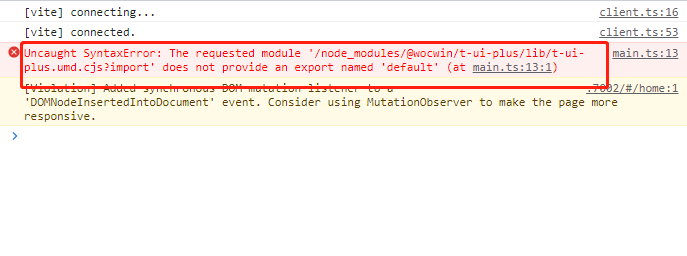
🔨 Vue3 + Vite 项目中安装引入报如下错误的解决方法
把项目的 vite 版本升级到 4+
docs 文档结构目录
├─ examples               # VPDemo组件自动解析此文件夹下的所有.vue文件
├─ components             # .md文件
├─ public                 # 静态资源文件
├─ .vitepress
│  ├─ config              # 插件配置
|  │  ├─ global.ts        # 全局变量定义
|  │  └─ plugins.ts       # 自定义.md文件渲染
│  ├─ theme               # 主题配置
│  ├─ utils               # 文档展开隐藏代码高亮
│  ├─ vitepress
|  │  ├─ vp-demo          # VPDemo组件源码
|  │  ├─ style            # VPDemo组件样式
|  │  └─ index.ts         # 暴露VPDemo组件
│  └─ config.ts           # vitepress配置文件
├─ index.md               # 文档home页面
├─ tsconfig.json          # typescript 全局配置
└─ vite.config.ts         # vite 全局配置文件(支持tsx)
Git 提交规范(PR 提交规范)
ci: ci 配置文件和脚本的变动;chore: 构建系统或辅助工具的变动;fix: 代码 BUG 修复;feat: 新功能;perf: 性能优化和提升;refactor: 仅仅是代码变动,既不是修复 BUG 也不是引入新功能;style: 代码格式调整,可能是空格、分号、缩进等等;docs: 文档变动;test: 补充缺失的测试用例或者修正现有的测试用例;revert: 回滚操作;